
🔔Check Request Status (Notifications Endpoint)
Check the status of asynchronous Phoenix API jobs using the notifications endpoint. Monitor job progress and retrieve entityGuid when processing completes.
Use this endpoint to check the current status of any asynchronous Phoenix API job.
This applies to:
- What-If Calculations
- HMRC Extracts (OI, BBSI)
- Rebalancing calculations
- Any asynchronous Phoenix operation that returns a correlationGuid
When you submit a job, Phoenix processes it asynchronously. The notifications endpoint allows you to monitor the job's progress and retrieve the entityGuid once processing completes.
📡 1. Endpoint Overview
Use the correlationGuid that was returned when you first submitted the job.
GET /notifications/{correlationGuid}Example Request:
https://fslpresales.fslcgix-uat.co.uk/FSLPresales_PhoenixApi/notifications/1c92781b-1d1c-4706-8a2e-d86dc21e1896🛠️ 2. Steps using Postman
-
Change the
HTTP verbfrom POST to GET -
Click on the Authorization tab and paste your previously generated API access token as the
Bearer Token🔐 To learn how to obtain an authorization token, see Obtaining an Access Token
-
Set the URL to the
/notifications/{correlationGuid}API endpoint. For example: https://fslpresales.fslcgix-uat.co.uk/FSLPresales_PhoenixApi/notifications/1c92781b-1d1c-4706-8a2e-d86dc21e1896
▶️ Sending the Request
Click the Send button to submit the prepared request.
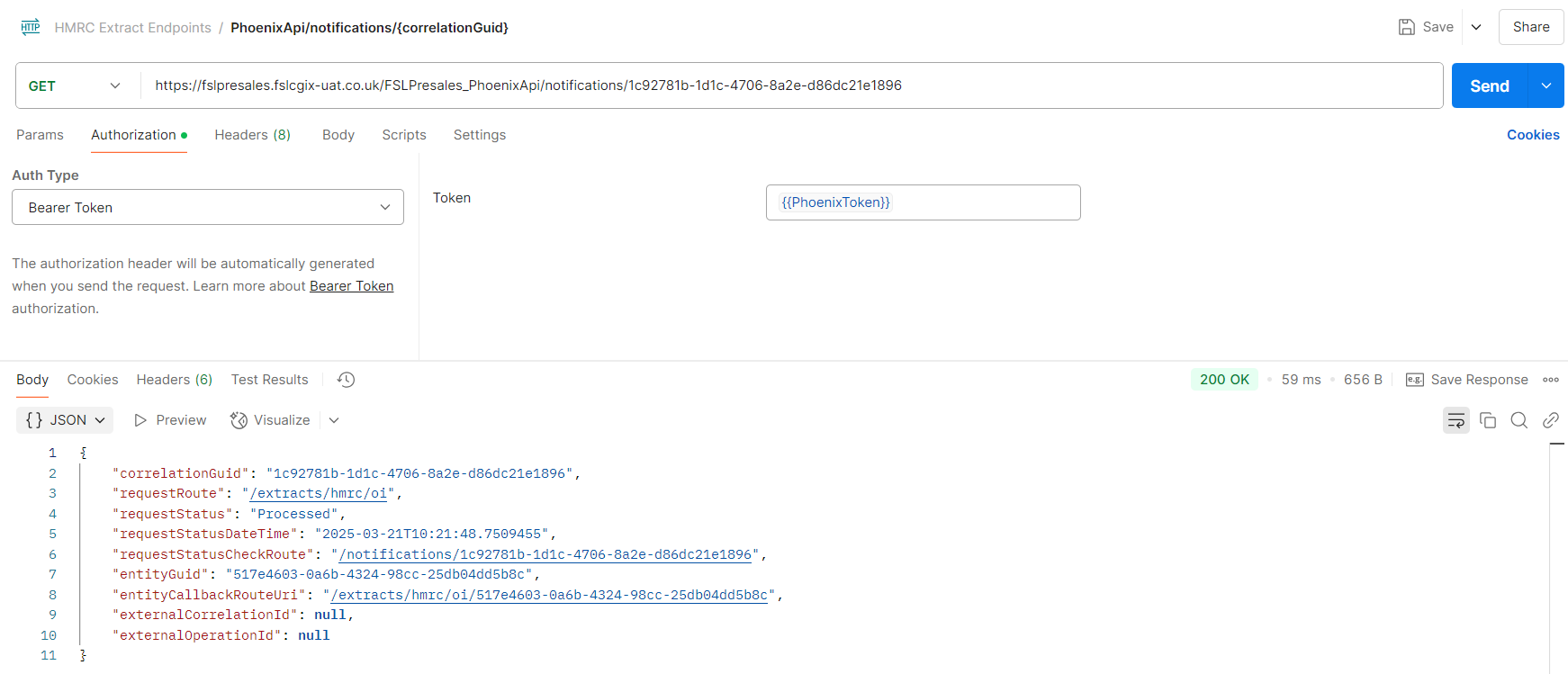
📬 Example Response (Processed)
The response includes the requestStatus and the entityGuid, which is essential for monitoring progress.
{
    "correlationGuid": "1c92781b-1d1c-4706-8a2e-d86dc21e1896",
    "requestRoute": "/extracts/hmrc/oi",
    "requestStatus": "Processed",
    "requestStatusDateTime": "2025-03-21T10:21:48.7509455",
    "requestStatusCheckRoute": "/notifications/1c92781b-1d1c-4706-8a2e-d86dc21e1896",
    "entityGuid": "517e4603-0a6b-4324-98cc-25db04dd5b8c",
    "entityCallbackRouteUri": "/extracts/hmrc/oi/517e4603-0a6b-4324-98cc-25db04dd5b8c",
    "externalCorrelationId": null,
    "externalOperationId": null
}
Once the request status changes to Processed, the completed output (e.g., extract or calculation result) is ready. The entityGuid from this response identifies the completed output linked to your request.
🔍 Key Fields Explained
- correlationGuid: The unique identifier for the job being tracked.
- requestRoute: The API route where the extract request was initiated.
- requestStatus: Current status of the request (e.g., Accepted, Processing, Completed).
- requestStatusDateTime: Timestamp indicating when the request status was last updated.
- requestStatusCheckRoute: API route to query the current status of the request.
- entityGuid: Identifier of the completed output (e.g., extract or calculation result). Use this GUID to retrieve the final data.
📊 Job Status Values
| Request Status | Description |
|---|---|
| 🟦 Accepted | The job has been queued and is awaiting processing. |
| 🟩 Processed | The job is complete and the extract is ready for download. |
| 🟧 Published | Notification has been sent out. |
| 🟥 Failed | An error occurred during processing. |
| 🟨 Pending | The job hasn't started and the original message is in the queue. |
Updated 11 months ago